800 million tokens for $7
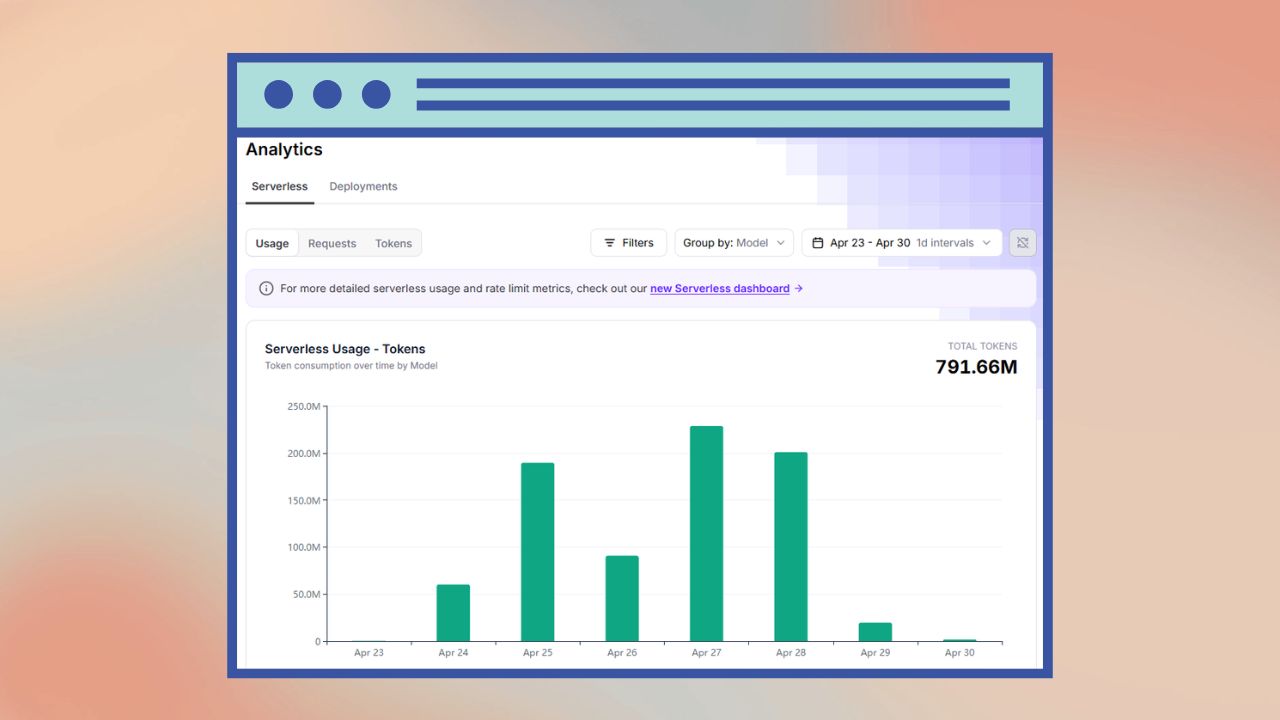
The story of how I processed nearly 800 million tokens worth of content for just $7.
The background
I like bugs, and so a few years ago I built Bugs with Mike. I wanted a place where I could have a blog about insects, spiders, and their kin. To supplement the blog pages (which I sporadically add to) and to expand my SEO footprint, I wanted to seed the website with a lot of supporting, technical data. In particular, I have a glossary of entomology terms and guide pages that are almost like mini Wikipedia pages for various groups of bugs. This helps capture SEO traffic, and I can have my blog posts automatically link to the glossary terms.
That initial seeding involved some web scraping, particularly of Wikipedia and BugGuide.net. I used the information from those sources to feed into the OpenAI API to generate the content for each of those pages. To save on costs I used batch API and gpt-4o (which at the time was new). This worked pretty well and I ended up with ~63,000 guide pages and ~5,500 glossary pages.
However, the biggest drawback to this approach was verifying the generated content. There was too much to manually review, so I had a shortlist of pages I would spot check to make sure things looked good. The vast majority of pages looked good, but over time I started to notice a few issues.
The problems
The first issue I found was related to how I sourced information for the pages. While gathering context for the pages, I relied on the Wikipedia search API. That worked pretty well unless, that is, the correct page did not exist. For example, there is a wasp known as Philolema latrodecti that preys on the black widow spider. Black widow spiders are in the genus Latrodectus. There is no Wikipedia page for Philolema latrodecti, but there is for Latrodectus. So, my API call to search for “Philolema latrodecti” returned the Latrodectus page as the top result. That meant my guide page for the wasp Philolema latrodecti ended up having information about black widow spiders. Not good. I manually updated that page, but I had lingering doubts about how many other pages had issues.
Another issue I discovered was my glossary page for the term “setisura”. From what I can gather, it is an outdated term, but the LLM had fabricated a definition for it, and it was starting to rise in the Google search rankings. So now I also had some doubts about the accuracy of my glossary pages.
To address my accuracy concerns, I once again turned to LLMs, but this time with some additional guardrails.
The money problem
I needed to 1) review and update my glossary pages and 2) review and update my guide pages. Again, with the sheer volume of pages, doing this manually was not an option. I needed a better way to ground the LLM responses with factual information.
My first thought was to use something like Tavily or Perplexity, both of which are AI-powered search tools that I use in other projects. I did a few test queries and they gave good results, but when projecting out the costs, I was going to be out several hundred dollars. For a blog that makes no money, that was not an option.
I next looked into using a traditional search engine API such as Brave, but also at my scale that was going to be expensive for the number of searches. Plus there would be some extra costs potentially with the LLM calls for validating/summarizing the results.
The solution
What I finally landed on was a multi-tiered approach. There are a few free sources such as the Encyclopedia of Life, iNaturalist, and Crossref that I could use to gather information and relevant papers. I kept Wikipedia in the pipeline, but the page title had to exactly contain the term I was looking up. This would avoid “Philolema latrodecti” matching “Latrodectus”, for example. I wanted to utilize BugGuide.net as well, but they’ve started blocking bots, so unfortunately I couldn’t do that.
To further supplement the context for the LLM, I was still thinking about a generic web search and filtering to a few trusted domains which publish entomology content. I tried using DuckDuckGo search from Python, but very quickly hit rate limits. I then realized that I could take my list of trusted sites, scrape them (those that didn’t block scraping that is), and surface results via a local search engine. I used Codex to set that up and I was in business. I could scrape those blogs once, then hit that endpoint as much as I wanted since I was running it locally on my laptop.
The last piece of the puzzle, now that I had all my context ready to go, was how to efficiently go through all those pages with an LLM. I was initially thinking about going with the OpenAI batch API again, but I had also been experimenting with open source models through FireWorks.ai. And as it turns out, they had just released something called FirePass. For $7/week, you got “unlimited” access to Kimi K2.5 Turbo. I ran a few generations using my new pipeline, and everything was looking pretty good.
On my end, I added some rate limiting controls with some intelligent backoffs. While FirePass is marketed as “unlimited”, it does still have rate limits. It took a few days to go through all my guide pages, but when all was said and done, I had processed nearly 800 million tokens worth of content within the span of 1 week - a total FirePass cost of $7. I did something similar for my glossary terms, but had some additional checks to make sure the terms were relevant to entomology, weren’t outdated, and were accurate.
Thoughts
In the end, I was pretty happy with how things turned out. I’m sure there is still some content in there that could be better, but overall, my pages are much more grounded in factual information than they were before.
A few weeks after I finished this process, FirePass increased their costs to $48/month (probably due to people like me) and upgraded to Kimi K2.6 Turbo. Still a bargain compared to running through a regular LLM API, at least when thinking about cost. I’m sure a better model could give better generations, but for what I was building, FirePass was perfect.
Why generate these pages instead of linking to them?
That is a good question. There are three reasons I opted for generating all these pages instead of linking out to them. The first is that I want to control the content of my site. If I link to another site, it is possible that that site could remove the page or go down entirely. By composing the information myself, I have a stable source of technical information to supplement the rest of the site. I still link out to those other pages in the Sources section of my page, but having the information locally makes it more reliable. The second reason is to improve my site’s SEO. I figured with a larger footprint, I could funnel more traffic to my blog. And the last reason - it just sounded like a fun challenge and a good way to learn the ins-and-outs of generating content at a large scale.